Draw Mondrian Art with coding at www.wescheme.org
Mondrian Art Example 1
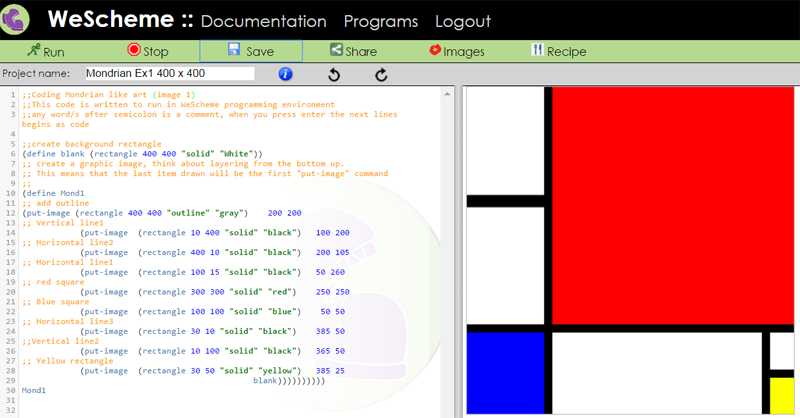
The graphic image below right was created by the programming code on the left. See below image for complete copy of the code.
Actual editable code http://tinyurl.com/mondrian-ex1
;;Coding Mondrian like art (image 1)
;;This code is written to run in WeScheme programming environment
;;any word/s after semicolon is a comment, when you press enter the next lines begins as code;;create background rectangle
(define blank (rectangle 400 400 "solid" "White"))
;; create a graphic image, think about layering from the bottom up.
;; This means that the last item drawn will be the first "put-image" command
;;
(define Mond1
;; add outline
(put-image (rectangle 400 400 "outline" "gray") 200 200
;; Vertical line1
(put-image (rectangle 10 400 "solid" "black") 100 200
;; Horizontal line2
(put-image (rectangle 400 10 "solid" "black") 200 105
;; Horizontal line1
(put-image (rectangle 100 15 "solid" "black") 50 260
;; red square
(put-image (rectangle 300 300 "solid" "red") 250 250
;; Blue square
(put-image (rectangle 100 100 "solid" "blue") 50 50
;; Horizontal line3
(put-image (rectangle 30 10 "solid" "black") 385 50
;;Vertical line2
(put-image (rectangle 10 100 "solid" "black") 365 50
;; Yellow rectangle
(put-image (rectangle 30 50 "solid" "yellow") 385 25
blank))))))))))Mond1